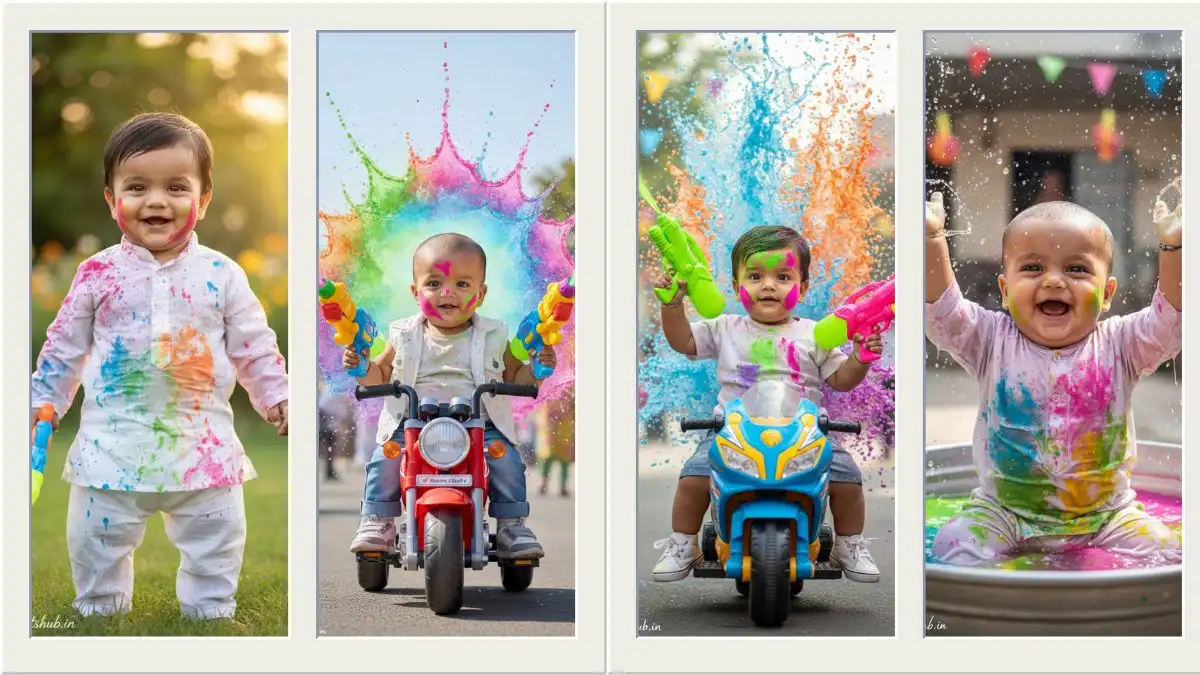
होली रंगों, खुशियों और यादगार पलों का त्योहार है। इस खास मौके पर हर माता-पिता चाहते हैं कि उनके बेबी बॉय की तस्वीर सबसे अलग और आकर्षक दिखे। आज के डिजिटल दौर में Holi Photo Editing Prompt Baby Boy की मदद से आप साधारण फोटो को भी क्यूट, रंगीन और वायरल AI इमेज में बदल सकते हैं।
सही AI प्रॉम्प्ट आपकी फोटो में नैचुरल गुलाल, सॉफ्ट लाइटिंग, फेस्टिव बैकग्राउंड और प्यारा एक्सप्रेशन जोड़ सकता है — जिससे तस्वीर और भी खास बन जाती है।
Holi Photo Editing Prompt Baby Boy क्या है?
यह एक खास टेक्स्ट निर्देश (AI Prompt) होता है, जिसे आप AI फोटो एडिटिंग टूल में लिखते हैं। इसके आधार पर AI आपकी बेबी बॉय की फोटो में होली का रंगीन माहौल, गुलाल इफेक्ट, ब्राइट कलर टोन और फेस्टिव बैकग्राउंड जोड़ देता है।
आपको बस सही और स्पष्ट शब्दों का इस्तेमाल करना है — बाकी काम AI खुद कर देता है।
Gemini AI से अपनी परफेक्ट फोटो कैसे बनाएं? (Easy Step-by-Step तरीका)
अगर आप पहली बार Google Gemini का इस्तेमाल कर रहे हैं और चाहते हैं कि आपकी फोटो natural, clean और impressive दिखे, तो नीचे दिए गए आसान स्टेप्स को follow करें।
Step 1: सबसे पहले इस आर्टिकल मे नीचे दिए गए फोटो के नीचे View Prompt बट्टन पर क्लिक करें ओर फिर प्रॉम्प्ट को कॉपी करें ।
Step 2: अब अपने मोबाइल या लैपटॉप के ब्राउज़र में किसी gemini.google.com विश्वसनीय AI इमेज एडिटिंग प्लेटफॉर्म को ओपन करें या Gemini की official app ओपन करें।
Step 3: अपने Google अकाउंट से login करें। Login होते ही आपको Gemini का chat और image generation वाला interface दिखाई देगा।
Step 4: यहाँ “Create Image” या “Edit Image” का option चुनें और अपने बेबी बॉय की एक clear, अच्छी quality वाली फोटो upload करें।
Step 5: अब जो Photo Editing Prompt आपने चुना है, उसे copy करके Gemini के input box में paste करें।
Step 6: “Generate” पर क्लिक करें। कुछ ही सेकंड में Gemini AI आपकी फोटो को प्रॉम्प्ट के अनुसार एक नई, stylish और realistic image में बदल देगा।
Step 7: तैयार इमेज को डाउनलोड करें और सोशल मीडिया पर शेयर करें।
अगर पहली image perfect न लगे, तो prompt में थोड़ा सा बदलाव करके दोबारा try करें — result और बेहतर मिलेगा।
Holi Photo Editing Prompt Baby Boy
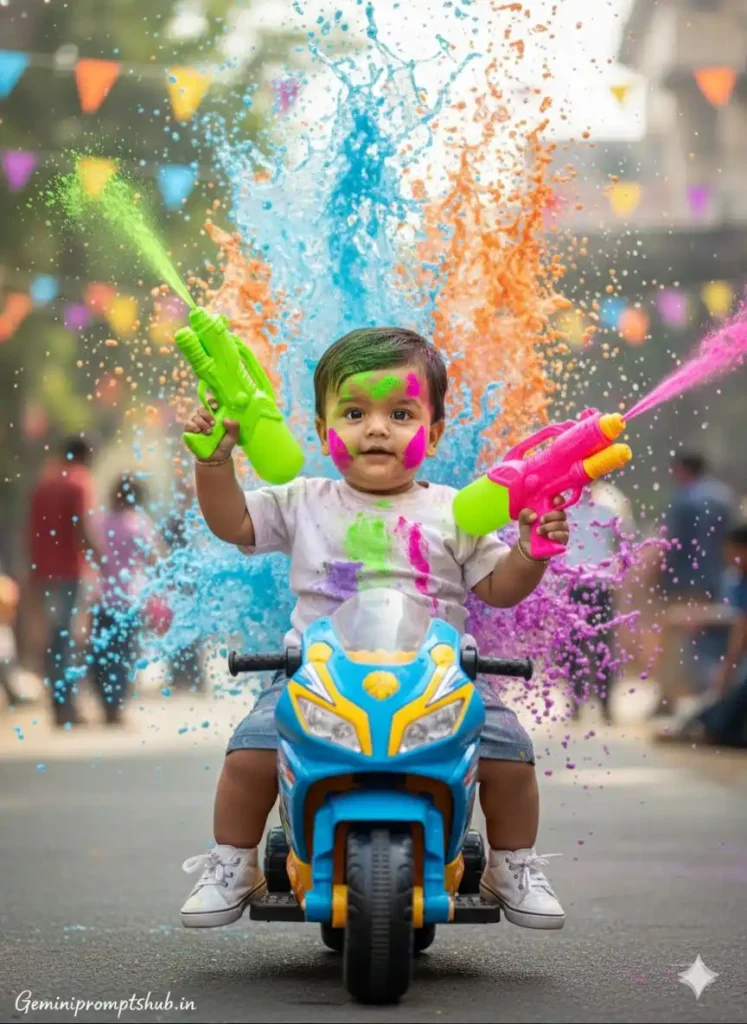
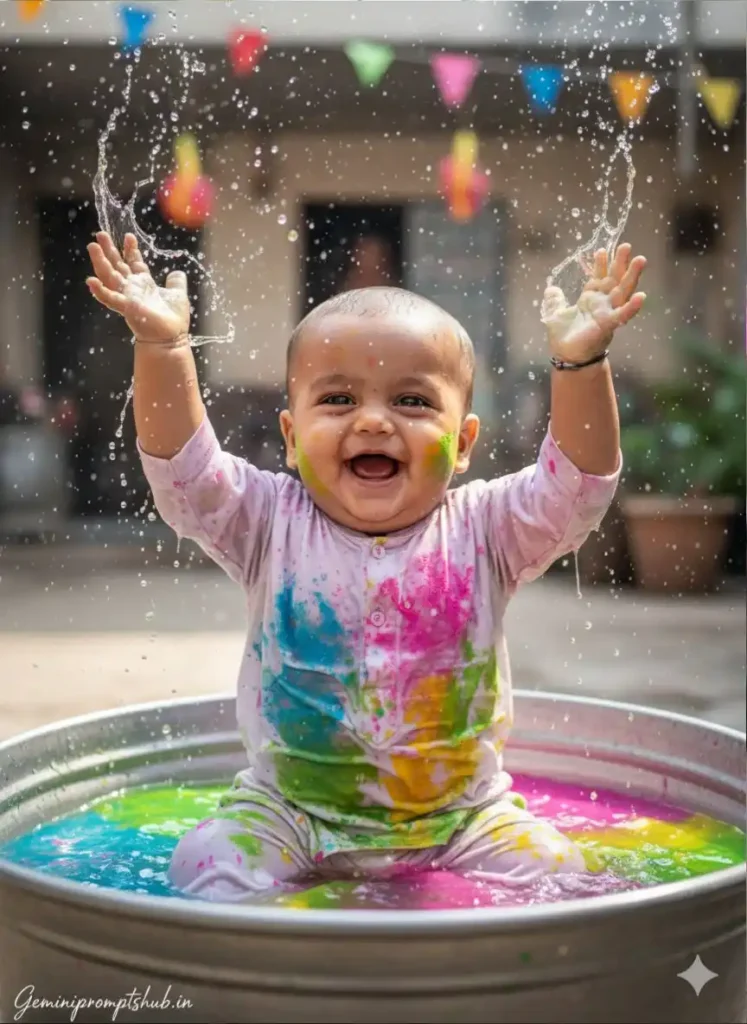
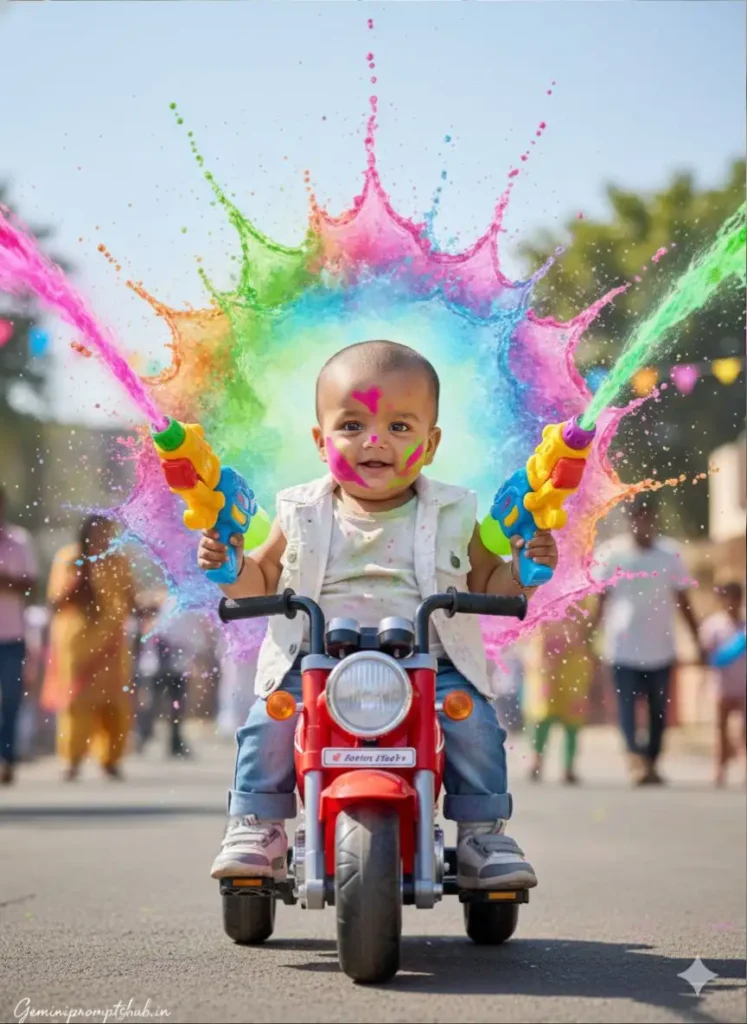
नीचे दिए गए सभी प्रॉम्प्ट के ऊपर इमेज दी गई है जिस से पता चल सके की दिए गए प्रॉम्प्ट से कैसे लुक मे फोटो बनेगी। अपनी पसंद के अनुसार प्रॉम्प्ट कॉपी करे ओर जेमिनी मे पेस्ट करे।
Prompt 1:
FACE LOCK — ULTRA REALISTIC NATURAL BABY FACE Use the uploaded baby face reference (if provided). Face must remain exactly natural. No reshaping. No beautification. No AI smoothing. Keep real baby skin texture, soft pores, natural cheeks, realistic baby expression. Must look like real DSLR photography. SCENE CONCEPT Ultra-realistic cinematic Holi action portrait of a stylish Indian baby boy. He is sitting confidently on a mini sporty toy bike. Bike design colorful but realistic plastic texture. He is holding two oversized neon-colored pichkaris like an action movie hero. One water gun raised slightly upward. The other pointed sideways. His cheeks and forehead are covered with neon green, purple, and pink gulal. Gulal texture must look realistic and powdery. BACKGROUND DETAILS Massive slow-motion splash of multi-colored water behind him. Water frozen mid-air with individual droplets clearly visible. Bright Holi colors exploding outward. Soft blurred festive outdoor setting in distance. Natural daylight environment. OUTFIT DETAILS White printed baby t-shirt with subtle Holi stains. Denim shorts. Small stylish sneakers. No unrealistic costume elements. EXPRESSION DETAILS Confident playful baby expression. Slight smile. Natural baby innocence. Eyes sharp and visible. LIGHTING DETAILS Bright natural daylight. Balanced exposure. Water droplets glowing in sunlight. Soft shadow under bike. Realistic highlight on baby’s face. CAMERA & QUALITY Low-angle cinematic perspective. Professional DSLR look. Ultra HD 8K clarity. Razor sharp focus on face. Background slightly depth blurred but clean. No motion blur. NEGATIVE PROMPT cartoon, CGI, illustration, painting, plastic skin, over-smooth texture, distorted limbs, extra fingers, low resolution, watermark except signature. TEXT / SIGNATURE Add “Geminipromptshub.in” at the bottom-left corner, HANDWRITTEN SIGNATURE-STYLE typography, thin cursive strokes, small size, subtle premium elegance, white or soft off-white color. ASPECT RATIO • 3:4 vertical
Prompt 2:
FACE LOCK — NATURAL BABY FACE PRESERVATION Use uploaded baby face reference (if available). Face must remain exactly the same. No reshaping. No beautification. No smoothing filter. Keep natural baby skin texture, soft cheeks, tiny pores, natural expression. Must look like real DSLR photograph — not AI generated. SCENE DESCRIPTION Ultra-realistic cinematic Holi celebration scene. A Indian baby sitting inside a large round metal water tub filled with bright pink, blue, yellow and green colored water. Baby raising both hands high in excitement, splashing colorful water upward. Water droplets frozen mid-air in slow motion. Fine powder particles floating around. White kurta pajama completely soaked and covered in vibrant Holi colors. Color texture realistic and wet. BACKGROUND Outdoor courtyard setting. Soft blurred festive environment. Colorful flags hanging in background. Subtle sunlight glow from side. Bright natural daylight. EXPRESSION Wide open joyful smile. Eyes sparkling with happiness. Natural playful baby energy. Authentic candid moment. LIGHTING Bright diffused daylight. Water droplets glistening in sunlight. Balanced exposure on baby face. Soft shadow inside tub. Natural skin tones. CAMERA & QUALITY Mid-close vertical portrait. 85mm DSLR lens feel. Ultra HD 8K clarity. Razor sharp focus on face. Shallow depth of field. Background softly blurred. 0% blur on subject. NEGATIVE PROMPT cartoon, CGI, painting style, plastic skin, distorted hands, extra fingers, blur, low resolution, watermark except signature. TEXT / SIGNATURE Add “Geminipromptshub.in” at the bottom-left corner, HANDWRITTEN SIGNATURE-STYLE typography, thin cursive strokes, small size, subtle premium elegance, white or soft off-white color. ASPECT RATIO • 3:4 vertical
Prompt 3:
FACE LOCK — 100% NATURAL BABY FACE PRESERVATION Use uploaded baby face reference if available. Face must remain exactly the same. No artificial modification. No beautification. No reshaping. Maintain realistic baby skin softness and texture. SCENE DESCRIPTION Ultra-realistic cinematic Holi celebration scene featuring a cool Indian baby boy. He is sitting on a bright red mini toy motorcycle. Both hands gripping two colorful giant pichkaris. Water streams blasting outward dramatically. His face is smeared with vibrant neon pink, blue, and green gulal. Powder texture detailed and realistic. BACKGROUND Large dramatic splash of colorful Holi water behind him. Color explosion shaped like a crown behind baby. Fine mist particles floating in air. Outdoor festive environment softly blurred. Bright sunny sky above. OUTFIT DETAILS White sleeveless baby jacket over pastel t-shirt. Mini denim jeans. Tiny sporty shoes. POSE DETAILS Baby sitting straight confidently. One pichkari slightly lifted upward. Second angled downward. Feet resting on toy bike pedals. EXPRESSION Happy playful expression. Natural baby smile. Bright lively energy. LIGHTING Bright afternoon sunlight. Subtle rim light outlining baby. Sharp highlight on sunglasses. Balanced natural skin tone. CAMERA & COMPOSITION Mid-full baby portrait. Slight low cinematic angle. Ultra HD 8K detail. Sharp face clarity. Professional DSLR capture feel. No blur on subject. NEGATIVE PROMPT low quality, blur, CGI look, cartoon style, painting, plastic face, distorted hands, watermark except signature. TEXT / SIGNATURE Add “Geminipromptshub.in” at the bottom-left corner, HANDWRITTEN SIGNATURE-STYLE typography, thin cursive strokes, small size, subtle premium elegance, white or soft off-white color. ASPECT RATIO • 3:4 vertical
Prompt 4:
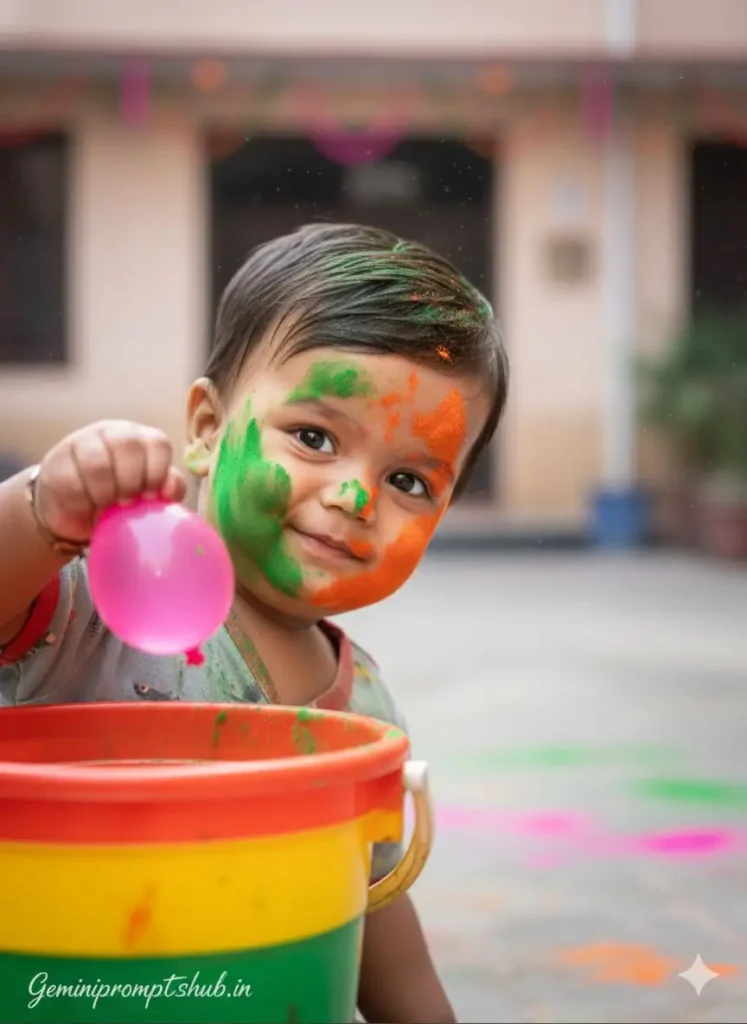
FACE LOCK — NATURAL BABY FACE (NO CHANGE ALLOWED) Use uploaded baby face reference (if available). Face must remain exactly the same. No reshaping. No beautification. No AI smoothing. Keep real baby skin texture, soft cheeks, tiny pores, natural expression. Must look like authentic DSLR photography. SCENE DESCRIPTION Ultra-realistic close-up portrait of a mischievous Indian baby boy during Holi festival. Baby hiding playfully behind a bright multi-colored plastic bucket. Only half of his face visible while peeking out sideways. Holding a bright pink water balloon tightly in one hand, ready to throw. His cheeks, nose and forehead smeared with vivid green and orange gulal. Powder texture soft and realistic. BACKGROUND Soft blurred outdoor courtyard. Color splashes on ground. Subtle festive decorations in distance. Natural daylight environment. Light floating powder particles in air. EXPRESSION DETAILS Naughty playful expression. Tiny mischievous smirk. Authentic candid baby moment. LIGHTING DETAILS Soft natural daylight. Gentle highlights on cheeks. Balanced exposure. Realistic shadow from bucket edge. Natural skin tone preservation. CAMERA & COMPOSITION Extreme close-up vertical portrait. 85mm DSLR lens feel. Ultra HD 8K clarity. Razor sharp focus on baby face. Shallow depth of field. Background softly blurred but clean. NEGATIVE PROMPT cartoon, CGI, painting style, plastic skin, distorted hands, extra fingers, blur, low resolution, watermark except signature. TEXT / SIGNATURE Add “Geminipromptshub.in” at the bottom-left corner, HANDWRITTEN SIGNATURE-STYLE typography, thin cursive strokes, small size, subtle premium elegance, white or soft off-white color. ASPECT RATIO • 3:4 vertical
Prompt 5:
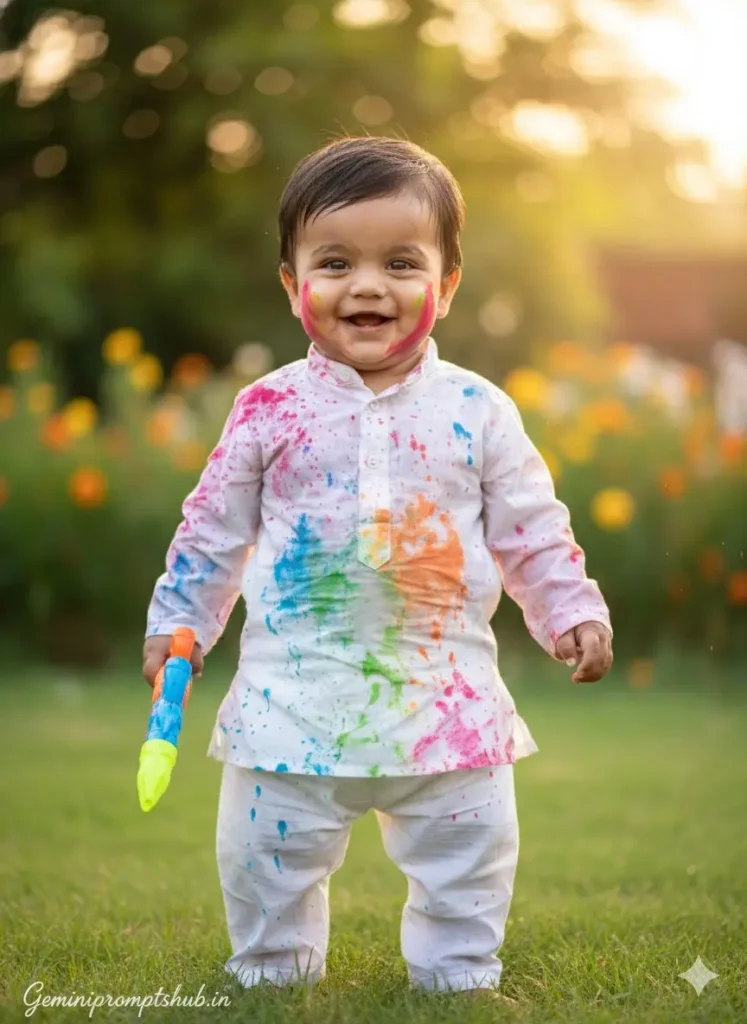
FACE LOCK — REALISTIC BABY FACE PRESERVATION Use uploaded baby face reference (if available). Face must remain exactly identical. No reshaping. No beautification. No AI smoothing. Keep real baby skin texture, natural pores, soft cheeks, authentic expression. Must look like real DSLR photography. SCENE DESCRIPTION Ultra-realistic candid portrait of a happy Indian baby during Holi celebration in a garden. Baby standing on soft green grass, holding a small colorful pichkari in one hand. White kurta-pyjama completely drenched with rainbow-colored water splashes. Fabric wet texture visible with natural folds. Tiny droplets glistening on sleeves and cheeks. BACKGROUND Soft blurred garden environment. Green trees and flowering plants. Golden sunlight filtering through leaves. Beautiful creamy bokeh circles in background. Festive yet peaceful atmosphere. EXPRESSION DETAILS Bright joyful smile. Eyes sparkling with happiness. Natural candid laugh. Playful innocent baby energy. LIGHTING DETAILS Warm golden-hour sunlight. Soft rim light outlining baby’s hair. Balanced exposure on face. Natural highlights and shadows. Skin tone preserved perfectly. CAMERA & COMPOSITION Mid-length vertical portrait. 85mm professional DSLR lens feel. Ultra HD 8K clarity. Razor sharp focus on face. Background softly blurred with natural depth of field. 0% blur on subject. NEGATIVE PROMPT cartoon, CGI, painting style, plastic skin, distorted hands, extra fingers, blur, low resolution, watermark except signature. TEXT / SIGNATURE Add “Geminipromptshub.in” at the bottom-left corner, HANDWRITTEN SIGNATURE-STYLE typography, thin cursive strokes, small size, subtle premium elegance, white or soft off-white color. ASPECT RATIO • 3:4 vertical
बेहतर रिज़ल्ट पाने के लिए उपयोगी टिप्स
प्रॉम्प्ट लिखते समय ऐसे शब्द शामिल करें जो तस्वीर को नेचुरल और जीवंत बनाएं, जैसे “realistic colors”, “natural gulal splash”, “soft golden sunlight”, “joyful holi vibe” आदि। सही शब्द ही शानदार रिज़ल्ट की कुंजी होते हैं।
बच्चे के चेहरे की क्लैरिटी पर खास ध्यान दें। AI इफेक्ट लगाते समय यह सुनिश्चित करें कि स्माइल, आँखें और एक्सप्रेशन साफ दिखाई दें — यही फोटो की असली जान होती है।
जरूरत से ज्यादा इफेक्ट, ग्लो या ब्लर न जोड़ें। हल्का और संतुलित एडिट हमेशा ज्यादा प्रोफेशनल और आकर्षक लगता है।
बैकग्राउंड ऐसा चुनें जो रंगीन तो हो, लेकिन ओवरलोडेड न लगे। बच्चों के लिए क्यूट, सॉफ्ट और फेस्टिव थीम सबसे अच्छा काम करती है।
अंतिम इमेज को हमेशा हाई रेज़ोल्यूशन में डाउनलोड करें, ताकि सोशल मीडिया पर शेयर करते समय फोटो पिक्सेलेट या धुंधली न दिखे।
छोटे-छोटे इन स्टेप्स को फॉलो करके आप अपने बेबी बॉय की होली फोटो को सच में खास और यादगार बना सकते हैं।
FAQs अक्सर पूछे जाने वाले सवाल
Q1. Holi Baby Boy AI Photo Prompt क्या होता है और कैसे काम करता है? Holi Baby Boy AI Photo Prompt एक टेक्स्ट निर्देश है, जिसे AI टूल में डालने पर आपकी फोटो में रंगों, गुलाल और फेस्टिव माहौल जैसे effects जोड़ दिए जाते हैं।
Q2. AI से Holi Baby Boy की फोटो कितनी रियल दिखती है? अगर प्रॉम्प्ट में सही शब्द और विवरण शामिल किया गया हो तो AI से बनाई गई Holi Baby Boy फोटो बहुत ही नैचुरल और प्रोफेशनल दिखाई देती है।
Q3. Holi Baby Boy AI फोटो मोबाइल पर कैसे बनाएं? मोबाइल ब्राउज़र या AI इमेज जनरेटर ऐप/वेबसाइट में फोटो अपलोड करें, Holi Baby Boy AI Prompt दर्ज करें और Generate बटन पर टैप करें — फोटो तैयार हो जाएगी।
Q4. Holi Baby Boy AI फोटो सोशल मीडिया पर पोस्ट करने लायक है या नहीं? हाँ, AI से तैयार की गई Holi Baby Boy फोटो Instagram, Facebook, WhatsApp Stories/Status के लिए पूरी तरह उपयुक्त और आकर्षक होती है।
Q5. Holi Baby Boy AI फोटो बनाने के लिए सबसे अच्छा प्रॉम्प्ट क्या लिखें? सबसे अच्छा प्रॉम्प्ट वही है जिसमें “realistic colors”, “natural gulal”, “soft lighting”, “kid-friendly festive background” जैसे शब्द शामिल हों — इससे फोटो अधिक सुंदर और नैचुरल बनेगी।
निष्कर्ष
Holi Photo Editing Prompt Baby Boy के जरिए आप अपने नन्हे राजकुमार की साधारण तस्वीर को रंगों से सजी, प्यारी और सोशल मीडिया पर छा जाने वाली होली इमेज में बदल सकते हैं। बस सही और संतुलित शब्दों वाला AI प्रॉम्प्ट लिखें, और कुछ ही पलों में फोटो में नेचुरल गुलाल, सॉफ्ट लाइट और खुशियों भरा फेस्टिव माहौल जुड़ जाएगा।
इस होली, अपने बेबी बॉय की मासूम मुस्कान को खास अंदाज़ दें। AI की मदद से हर तस्वीर को ऐसा रंगीन रूप दें, जो सालों तक यादों में चमकता रहे और देखने वालों का दिल जीत ले।