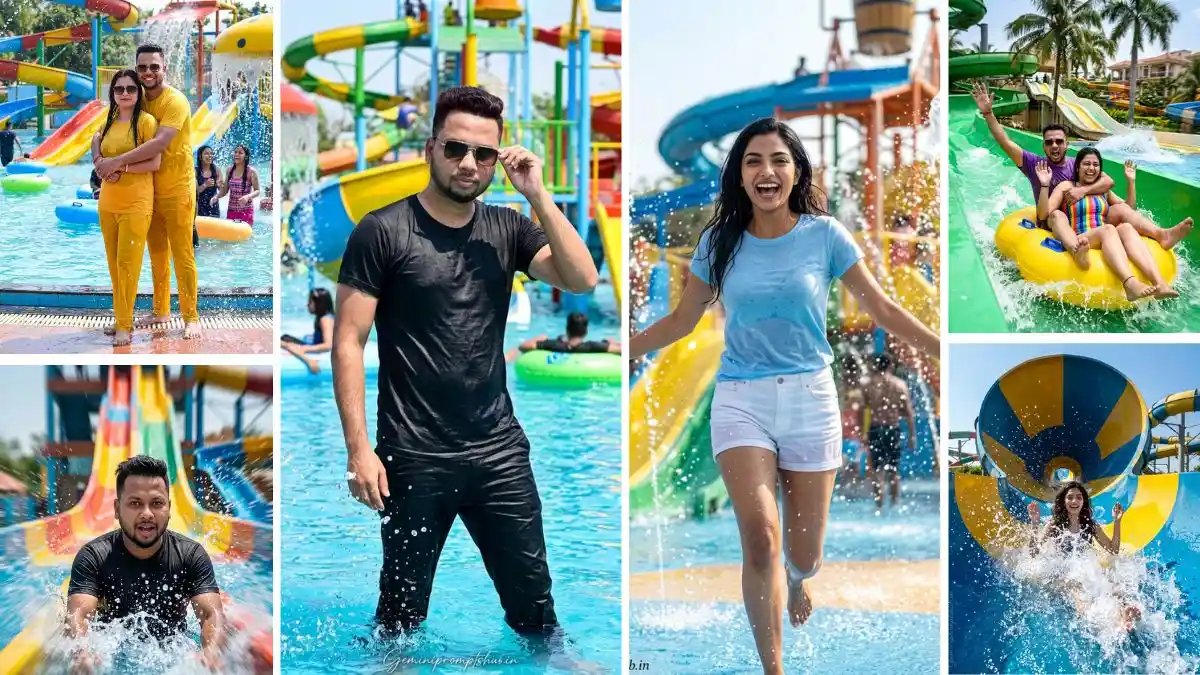
Waterpark Photo Editing Prompt

Waterpark Photo Editing Prompt: Step-by-Step सीखें Realistic, Cinematic और 4K AI Images बनाना

Waterpark की photos वैसे ही fun और energetic होती हैं, लेकिन जब उन्हें सही तरीके से edit या create किया जाता है, तो वो और भी ज्यादा attractive लगने लगती हैं। अक्सर लोग Waterpark Photo Editing Prompt या Waterpark AI Photo Prompt use तो कर लेते हैं, लेकिन समझ नहीं होने की वजह से result उतना अच्छा नहीं आता।

इस article में आपको simple तरीके से समझाया जाएगा कि कैसे Waterpark HD Images Prompt, Waterpark Slide Photo Prompt और Waterpark Splash Photo Editing Prompt को सही तरह से use करें, ताकि आपकी images ज्यादा natural और realistic दिखें।

अगर आप चाहते हैं कि आपकी photos थोड़ा cinematic feel दें और बाकी लोगों से अलग दिखें, तो यह guide आपके लिए आसान और useful रहेगी।

कैसे पहचानें कि आपकी Image सही बन रही है या नहीं

जब आप कोई image बनाते हैं, तो खुद से एक simple सवाल पूछें — “क्या ये real लग रही है?”
अगर skin, water या lighting unnatural लग रही है, तो समझ जाओ कि कुछ improve करना है। एक अच्छी image वो होती है जिसे देखकर लगे कि ये सच में camera से ली गई है।

Beginner से Pro Image बनाने का तरीका

नीचे मैंने simple और practical steps दिए हैं — हर point के साथ छोटा explanation भी है ताकि reader सच में सीख सके

  • 1. Basic से शुरुआत करें: शुरुआत में simple scene से काम करें — जैसे pool, slide या splash moment। इससे आपको समझ आता है कि AI कैसे react करता है और image कैसे बनती है।
  • 2. Clear Idea रखें: Image बनाने से पहले दिमाग में clear picture होनी चाहिए कि आपको क्या चाहिए। बिना सोचे बनाओगे तो result भी random आएगा।
  • 3. Step-by-Step Detail Add करें: एकदम से heavy detail मत डालो। पहले basic बनाओ, फिर धीरे-धीरे lighting, background और mood add करो। इससे control बना रहता है।
  • 4. Lighting को समझो: Lighting ही image का mood तय करती है। bright light = fun feel, soft light = calm feel। सही lighting चुनने से image automatic better लगती है।
  • 5. Motion और Expression पर ध्यान दें: Waterpark images में movement और reaction सबसे important होते हैं। अगर ये natural दिखते हैं, तो image ज्यादा engaging बनती है।
  • 6. Result को Analyse करें: Image बनाकर छोड़ मत दो — उसे ध्यान से देखो। कहाँ improvement चाहिए, और क्या fake लग रहा है — ये समझना जरूरी है।
  • 7. Small Changes Try करें: हर बार पूरा बदलने की जरूरत नहीं। छोटी-छोटी चीजें बदलकर देखो — जैसे angle, light या mood। यही process आपको improve करता है।
  • 8. Over Editing से बचें: ज्यादा effects डालने से image खराब हो जाती है। जितना natural रखोगे, उतना ही professional लगेगा।
  • 9. Consistency बनाए रखें: एक-दो बार try करने से mastery नहीं आती। रोज practice करने से ही धीरे-धीरे pro level समझ आती है।

Final Tip

Beginner से pro बनने का एक ही तरीका है — simple से start करो, mistakes से सीखो और धीरे-धीरे improve करते रहो।

Waterpark AI Photo Prompt

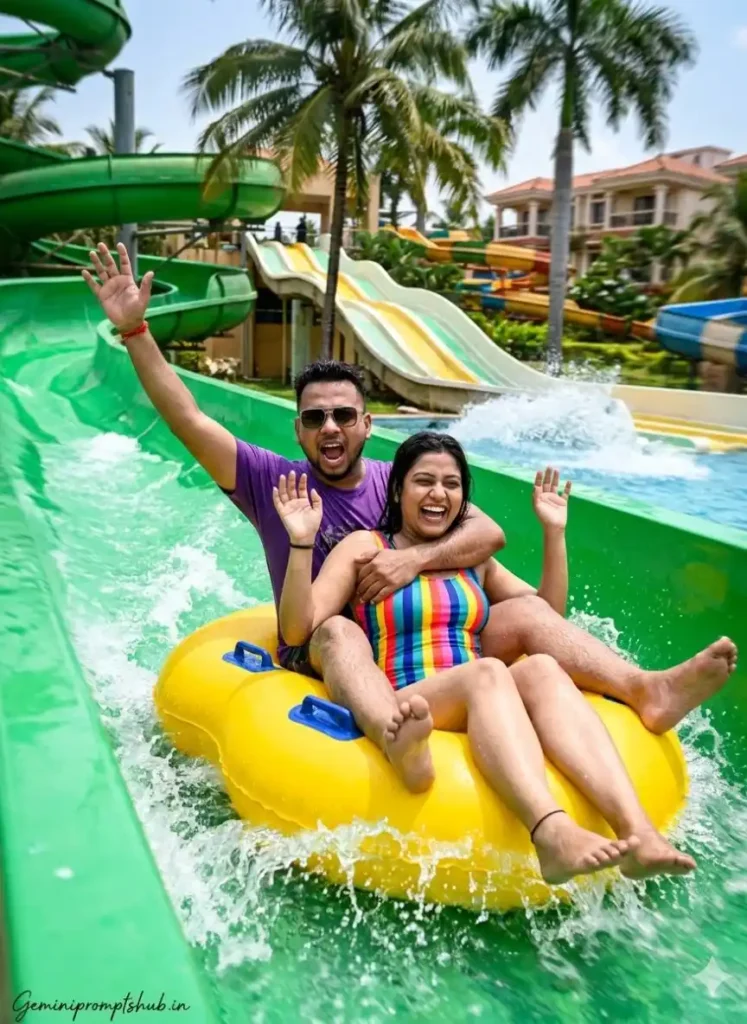
Couple Slide Adventure

Explanation: इस scene में action और emotion दोनों का mix है। slide ride के दौरान excitement, splash और movement capture होता है, जिससे image lively और storytelling वाली बनती है।
Waterpark Photo Editing Prompt
Ultra-realistic action photo of a couple riding a green water slide in a tropical water park, sitting on a yellow inflatable tube. Both raising hands in excitement, laughing and shouting. Strong water splashes and motion captured mid-action. The woman is in a colorful striped swimsuit, the man wearing a purple t-shirt and sunglasses. Palm trees and multiple slides in the background. Bright daylight, high contrast, dynamic composition, motion blur with splash freeze effect. Hug pose. ASPECT RATIO: 3:4 vertical TEXT / SIGNATURE: Add “Geminipromptshub.in” bottom-left, handwritten signature-style, thin cursive strokes, small size, subtle premium elegance, white/soft off-white.

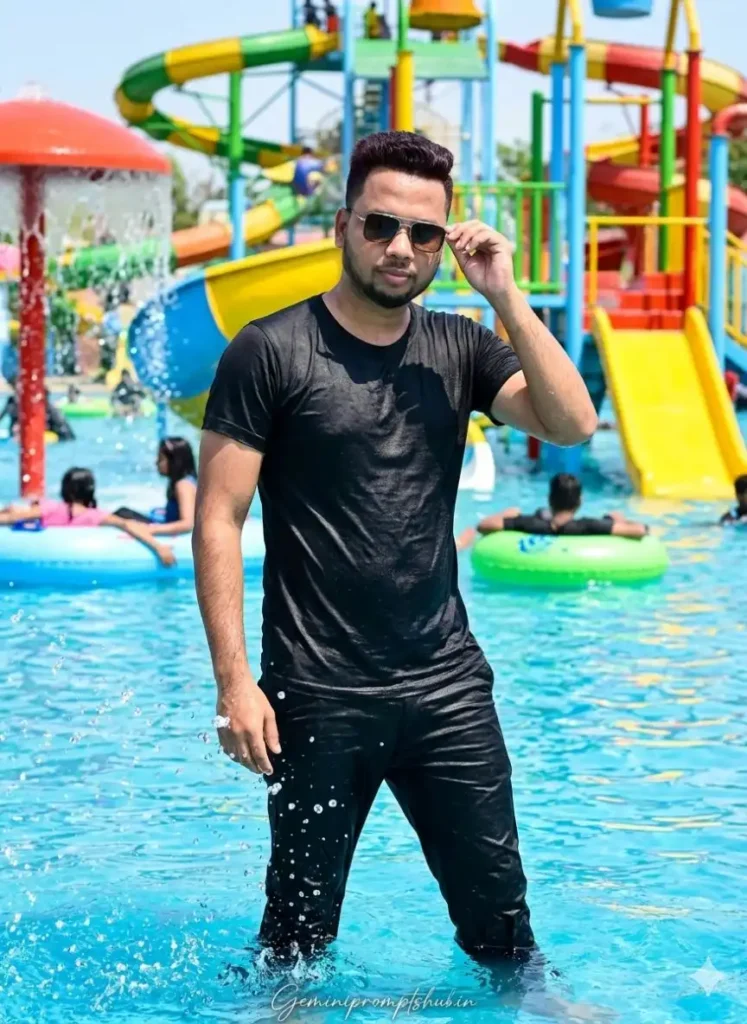
Poolside Confidence Portrait

Explanation: यह एक calm लेकिन stylish moment दिखाता है जहाँ subject pool edge पर natural pose में है। इसमें lighting और background depth image को cinematic बनाते हैं, जिससे photo ज्यादा premium और realistic लगती है।
Waterpark Photo Editing Prompt
FACE LOCK – MUST FOLLOW Use both uploaded reference photos (boy & girl). Face must be 100% exact same — no reshaping, no beautification, no AI modification. Preserve real skin texture, facial structure, hairstyle, age, and expression exactly as original. Ultra-HD face clarity, fully human look. Ultra-realistic portrait using my uploaded selfie as the face. I am in the water at vibrant water park-colorful slides, splash zone, floating tubes, people enjoying, water droplets, reflections. Standing confidently at the pool edge with natural stylish pose, slight water splash around me. Outfit: Black T-shirt and Black pants with and r, both slightly wet. Bright sunny sky, cinematic depth of field, cool tones, summer vibe. ASPECT RATIO: 3:4 vertical TEXT / SIGNATURE: Add “Geminipromptshub.in” bottom-left, handwritten signature-style, thin cursive strokes, small size, subtle premium elegance, white/soft off-white.

Wave Pool Fun Shot

Explanation: इसमें natural fun और carefree mood दिखता है। wave action और water droplets image को realistic बनाते हैं, जिससे scene ज्यादा engaging लगता है।
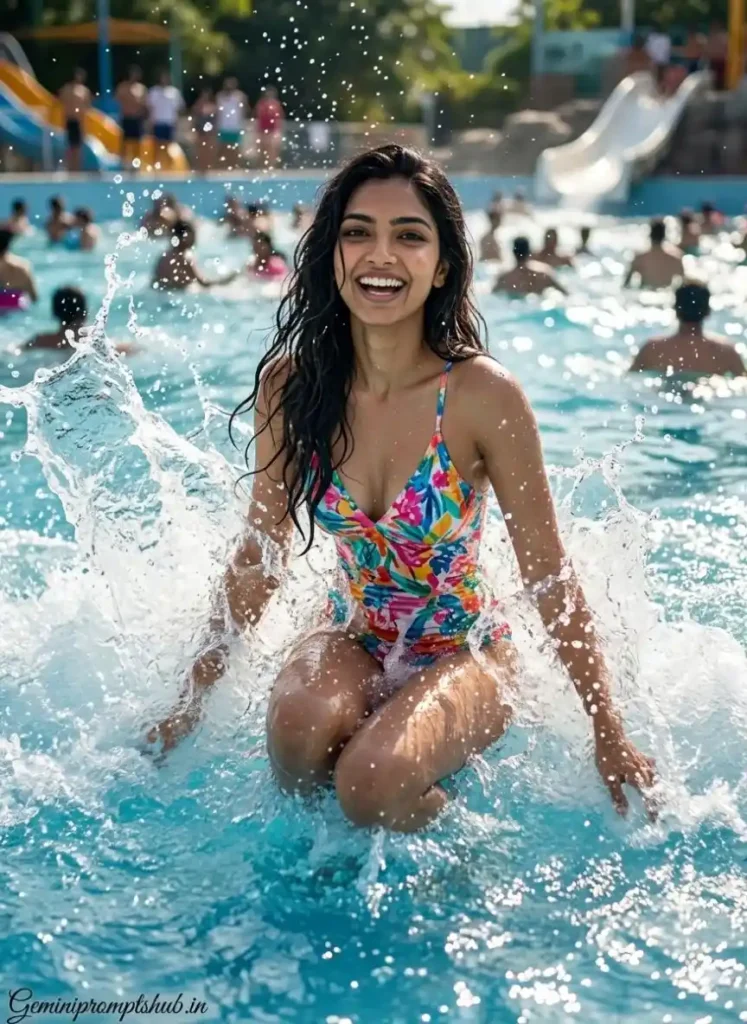
Waterpark Photo Editing Prompt
FACE LOCK – STRICT ENFORCEMENT: Use the uploaded reference image exactly as it is. The face must remain unchanged and identical in every detail. A young girl happily playing in a wave pool, jumping as artificial waves hit, water splashing high in the air, carefree joyful expression, wet hair flowing naturally, bright sunlight creating sparkling water reflections, people enjoying in the background, cinematic slow-motion capture, vibrant summer colors, realistic skin texture with water droplets, ultra HD, 4K, energetic and fun-filled atmosphere ASPECT RATIO: 3:4 vertical TEXT / SIGNATURE: Add “Geminipromptshub.in” bottom-left, elegant cursive, small size.

High-Speed Water Slide Action Shot

Explanation: यह scene speed और excitement को capture करता है। इसमें focus motion और water splash पर रहता है, जिससे image dynamic और energetic लगती है। Face lock होने की वजह से identity natural बनी रहती है और पूरा shot sports photography जैसा feel देता है।
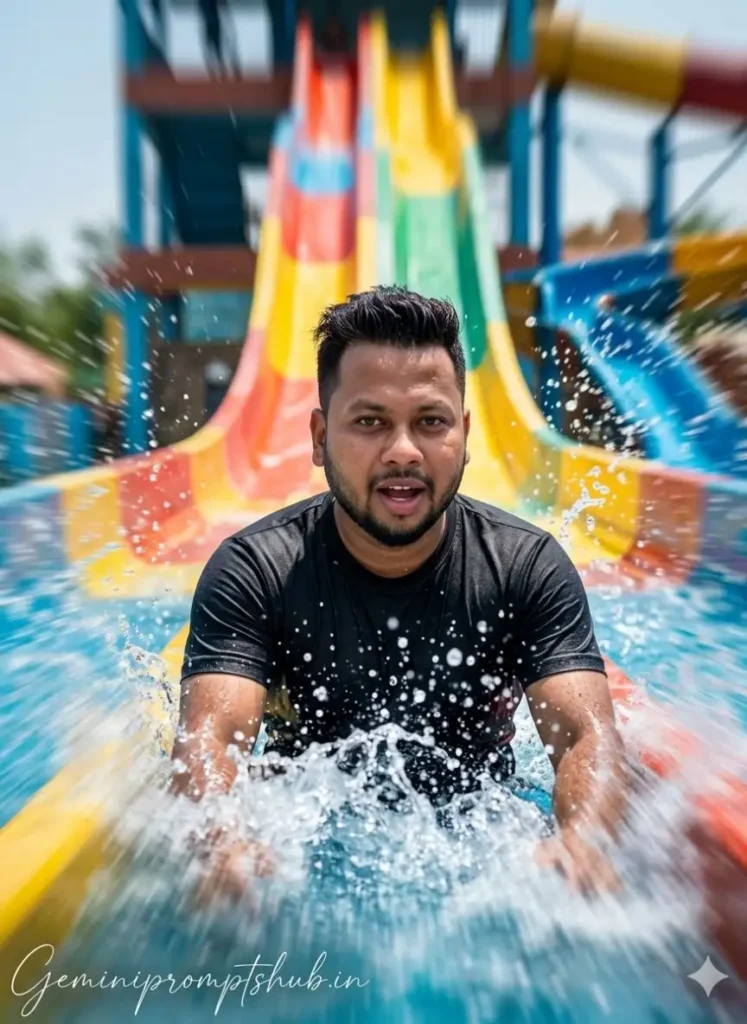
Waterpark Photo Editing Prompt
FACE LOCK – MUST FOLLOW Use both uploaded reference photos (boy & girl). Face must be 100% exact same — no reshaping, no beautification, no AI modification. Preserve real skin , facial structure, hairstyle, age, and expression exactly as original. Ultra-HD face clarity, fully human look. wearing a black t-shirt. An action-packed waterpark photoshoot, person sliding down a giant colorful water slide, water splashes captured in mid-air, high-speed motion effect, bright daylight, exciting expressions, sharp focus on subject, blurred background for motion feel, vibrant colors, cinematic framing, ultra HD, 4K, professional sports photography style. ASPECT RATIO: 3:4 vertical TEXT / SIGNATURE: Add “Geminipromptshub.in” bottom-left, handwritten signature-style, thin cursive strokes, small size, subtle premium elegance, white/soft off-white.

Couple Waterpark Vibe

Explanation: यह prompt couple bonding और aesthetic look पर focus करता है। Matching outfits और water reflections image को visually appealing बनाते हैं, जिससे यह social media friendly और eye-catching लगता है।
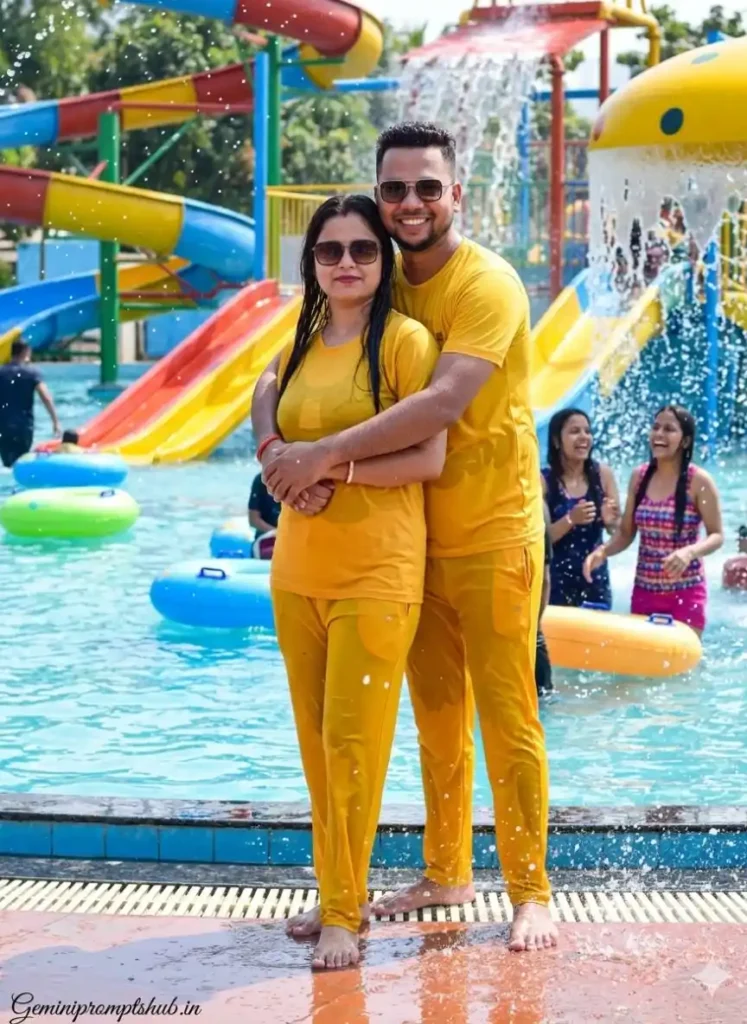
Waterpark Photo Editing Prompt
Ultra-realistic portrait using my uploaded selfie as the faces. We are stylish couple standing in the water at a vibrant water park-colorful slides, splash zone, floating tubes, people enjoying, water droplets and reflections all around. We are standing confidently at the pool edge in a natural, romantic and stylish pose, slight water splash around us. Outfit: Matching yellow T-shirts and yellow pants with both slightly wet and trendy. Bright sunny sky, ASPECT RATIO: 3:4 vertical TEXT / SIGNATURE: Add “Geminipromptshub.in” bottom-left, handwritten signature-style, thin cursive strokes, small size, subtle premium elegance, white/soft off-white.

Waterpark Entry Moment

Explanation: यह शुरुआत का moment दिखाता है जहाँ excitement peak पर होती है। running motion और splash zone image को lively बनाते हैं, जिससे viewer को real experience feel होता है।
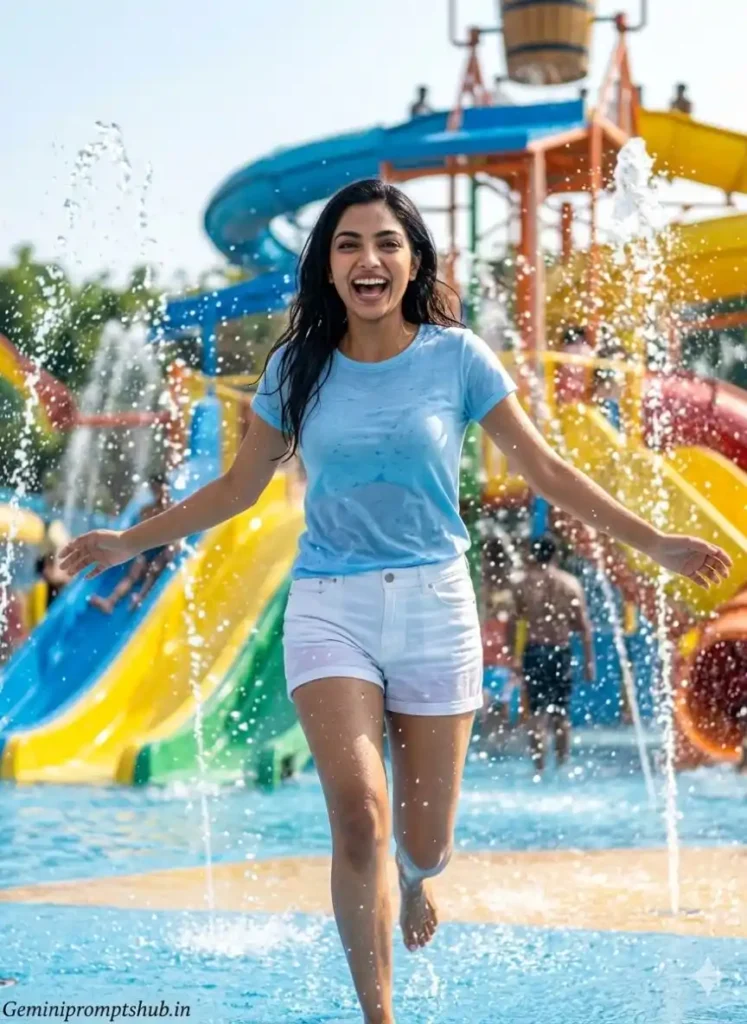
Waterpark Photo Editing Prompt
FACE LOCK – STRICT ENFORCEMENT: Use the uploaded reference image exactly as it is. The face must remain 100% identical — no changes, no beautification, no AI alterations. Preserve natural skin texture, facial structure, proportions, hairstyle, age, and original expression. A young girl excitedly entering a vibrant waterpark, running toward a splash zone with water fountains spraying around, bright sunny day, colorful slides in the background, joyful and energetic expression, casual summer outfit slightly wet, water droplets sparkling in sunlight, dynamic movement captured mid-step, cinematic wide-angle composition, soft shadows, vibrant colors, ultra-realistic details, DSLR photography style, 4K resolution, lively summer vibe. ASPECT RATIO: 3:4 vertical TEXT / SIGNATURE: Add “Geminipromptshub.in” bottom-left, thin cursive, subtle white.

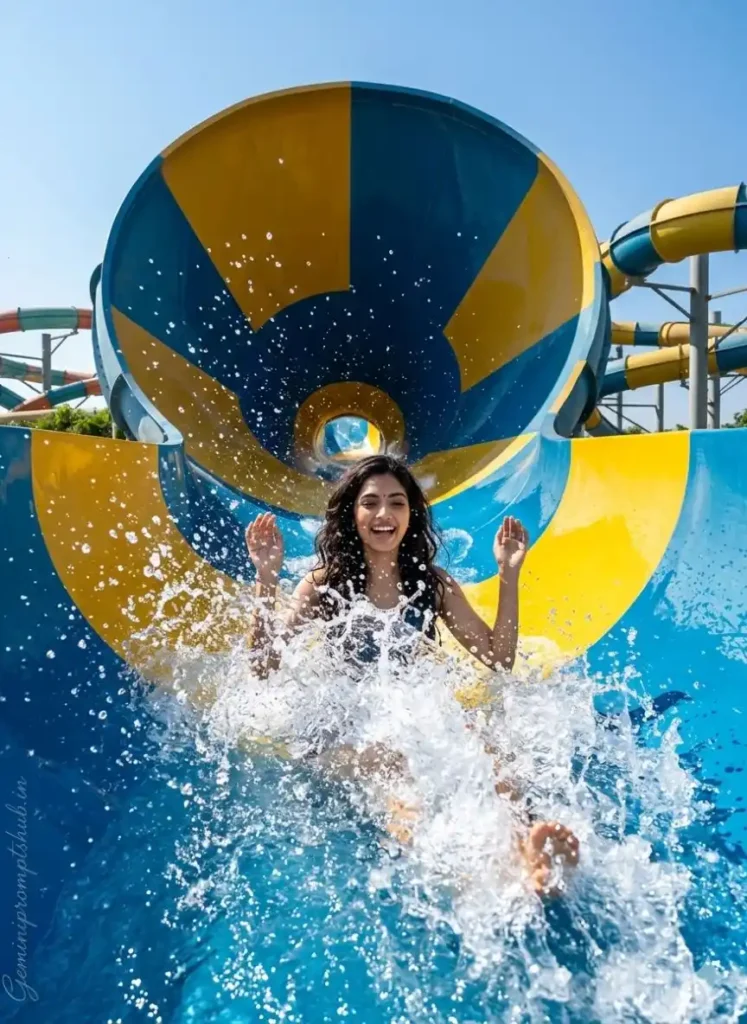
Giant Funnel Ride Thrill

Explanation: यह सबसे intense और thrilling moment को capture करता है। funnel ride की curved motion और splash effects image को cinematic और high-impact बनाते हैं।
Waterpark Photo Editing Prompt
FACE LOCK – STRICT ENFORCEMENT: Use the uploaded reference image exactly as it is. The face must remain 100% identical — no changes, no beautification, no AI alterations. Preserve natural skin texture, facial structure, proportions, hairstyle, age, and original expression. A young girl enjoying a giant funnel water ride, sliding into a massive circular funnel with water splashing dramatically around her, hands slightly raised in excitement, joyful and fearless expression, bright blue sky above, sunlight reflecting on water, dynamic curved motion on the walls, cinematic wide-angle shot, high-speed action feel, ultra-realistic water physics, vibrant colors, DSLR photography style, 4K resolution, adventure and thrill vibe. ASPECT RATIO: 3:4 vertical TEXT / SIGNATURE: Add “Geminipromptshub.in” bottom-left, thin cursive, subtle premium white.

Gemini का उपयोग करके Images बनाने का स्मार्ट तरीका

  • Step 1: Gemini खोलें
    अपने फोन या लैपटॉप में Gemini खोलें और ready हो जाएं image बनाने के लिए।
  • Step 2: Idea सेट करें
    सबसे पहले यह तय करें कि आपको कैसी image चाहिए — fun, cinematic या simple। बिना idea के result सही नहीं आएगा।
  • Step 3: Simple Prompt लिखें
    अब अपने idea को आसान शब्दों में लिखें या फिर इस लेख में दिए गए Prompt Copy करके use करें।
  • Step 4: Create पर क्लिक करें
    Prompt डालकर generate बटन दबाएं और AI को काम करने दें।
  • Step 5: Output को समझें
    Image आने के बाद बस देखना ही नहीं, समझना भी है — क्या अच्छा लगा, क्या नहीं।
  • Step 6: Improve करें
    छोटा सा बदलाव करें (light, mood या detail) और फिर से try करें — यहीं से improvement शुरू होती है।
  • Step 7: Final Image Save करें
    जब image सही लगे, उसे save कर लें और use करें।

FAQ (सवाल जो सच में काम के हैं)

Q1. Waterpark Splash Photo Editing Prompt में सबसे common गलती क्या होती है?
लोग over-detailing कर देते हैं या unrealistic effects डाल देते हैं। simple और natural description ज्यादा अच्छा result देता है।

Q2. Beginner के लिए सबसे आसान तरीका क्या है?
पहले simple prompt से शुरू करें, फिर धीरे-धीरे details add करें। एकदम complex prompt से शुरुआत करने पर confusion होता है।

Q3. Waterpark HD Images Prompt में HD feel कैसे लाएं?
“ultra HD, 4K, sharp focus, natural colors” जैसे words add करें और extra effects avoid करें, तभी image clean और clear दिखेगी।

निष्कर्ष

अगर आप सही तरीके से Waterpark Photo Editing Prompt का इस्तेमाल करते हैं, तो एक simple photo भी काफी बेहतर और attractive बन सकती है। फर्क सिर्फ इतना होता है कि आप prompt को कैसे समझकर use कर रहे हैं।

इस article में आपने जाना कि Waterpark AI Photo Prompt, Waterpark HD Images Prompt, Waterpark Slide Photo Prompt और Waterpark Splash Photo Editing Prompt को सही तरह से use करके images को ज्यादा natural और engaging बनाया जा सकता है।

बस ध्यान रखें — थोड़ा experiment करें, छोटी-छोटी changes करें, और हर बार result को improve करने की कोशिश करें। यही तरीका आपको बेहतर output देगा।

Latest Prompt Ideas देखने के लिए इन लेखों पर भी नजर डालें:-

Share on Social Media

About the Author

मेरा नाम Lavit Rao है, और मुझे AI tools, photo editing prompts और digital content creation में खास दिलचस्पी है। मैं ऐसे topics पर काम करता हूँ जो आज के समय में तेजी से grow कर रहे हैं—जैसे AI image generation और prompt engineering। मेरा focus simple और practical content बनाने पर रहता है, ताकि कोई भी beginner आसानी से समझ सके और इस्तेमाल कर सके। मैं लगातार नए tools और techniques पर experiment करता हूँ और वही चीज़ें share करता हूँ जो सच में काम करती हैं और users के लिए useful होती हैं।
Join WhatsApp Group