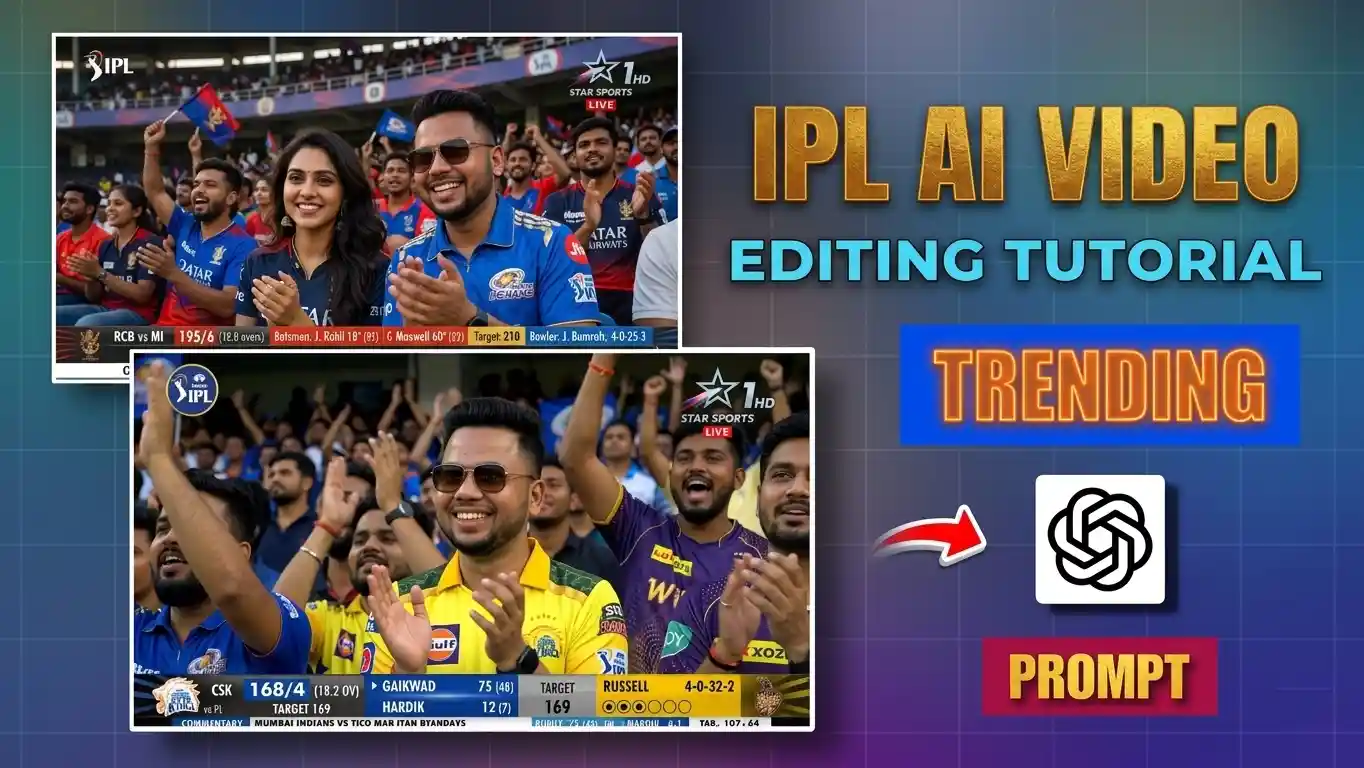
आजकल अगर आप Instagram, YouTube या Facebook पर reels देखते हैं, तो आपने ज़रूर notice किया होगा कि IPL trending AI video बहुत तेज़ी से वायरल हो रही हैं। कभी कोई स्टेडियम की audience में दिखता है, कभी crowd cam पर reaction देता है, और पहली नज़र में लगता है जैसे सच में मैच देखने गया हो। यही वजह है कि viral IPL AI video अभी creators के बीच सबसे तेजी से बढ़ता trend बन चुका है।
पिछले कुछ दिनों में मैंने भी कई अलग-अलग tools पर test किया कि ये viral IPL AI video आखिर बनती कैसे है। शुरू में सिर्फ फोटो से वीडियो बनाने पर result उतना real नहीं आया — चेहरा बदल जाता था या scene fake लगता था। लेकिन जब सही IPL AI video prompt और सही workflow use किया, तब output वैसा आया जैसा लोग अभी reels में डाल रहे हैं।
इस गाइड में वही तरीका है जो अभी creators use कर रहे हैं — पहले realistic stadium image बनाना, फिर उसे AI tools से motion देना। अगर आप viral IPL AI video बनाना चाहते हैं, तो इस लेख में पूरा स्टेप बाय स्टेप workflow समझाया गया है — image से लेकर final video तक, paid और free दोनों तरीके।
Viral IPL AI Video बनाने का सही तरीका क्या है?
अभी जो IPL trending AI video सोशल मीडिया पर चल रही हैं, उनमें एक common बात होती है — पहले image बनाई जाती है, फिर उसी image को video में बदला जाता है। बहुत लोग सीधे फोटो से वीडियो बनाते हैं, इसलिए result fake दिखता है।
मेरे अनुभव में, अगर पहले एक realistic stadium screenshot तैयार किया जाए और फिर उसे motion दिया जाए, तो viral IPL AI video कहीं ज्यादा natural लगती है। यही तरीका अभी कई creators use कर रहे हैं।
इस process में ये चीज़ें सबसे जरूरी हैं:
- सही image-to-video tool
- सही IPL AI video prompt
- पहले stadium screenshot जैसी photo बनाओ
- face lock रखो
- exact TV overlay add करो
- फिर image-to-video tool में prompt के साथ चलाओ
- output को हल्का trim करके reels में डालो
यहीं से वो असली result आता है जो आजकल Reels में देखा जा रहा है।
Step 1: पहले Gemini या ChatGPT से IPL broadcast style image बनाएं
अच्छी viral IPL AI video की शुरुआत image से होती है। अगर image ही weak होगी, तो video भी natural रियल जैसी नहीं बनेगी।
इसके लिए Google Gemini या ChatGPT इस्तेमाल कर सकते हैं। अपनी clear photo upload करें और stadium crowd वाली image बनाएं। नीचे दिए गए Image Prompt को copy करके paste करें।
यहीं आपका पहला स्टेप पूरा होता है। IPL AI reel video बनाने का। prompt में stadium, score overlay, audience reaction और face lock जैसे words जरूर रखें।
ध्यान दें:
- फोटो front face हो
- HD quality हो
- light साफ हो
- expression normal हो
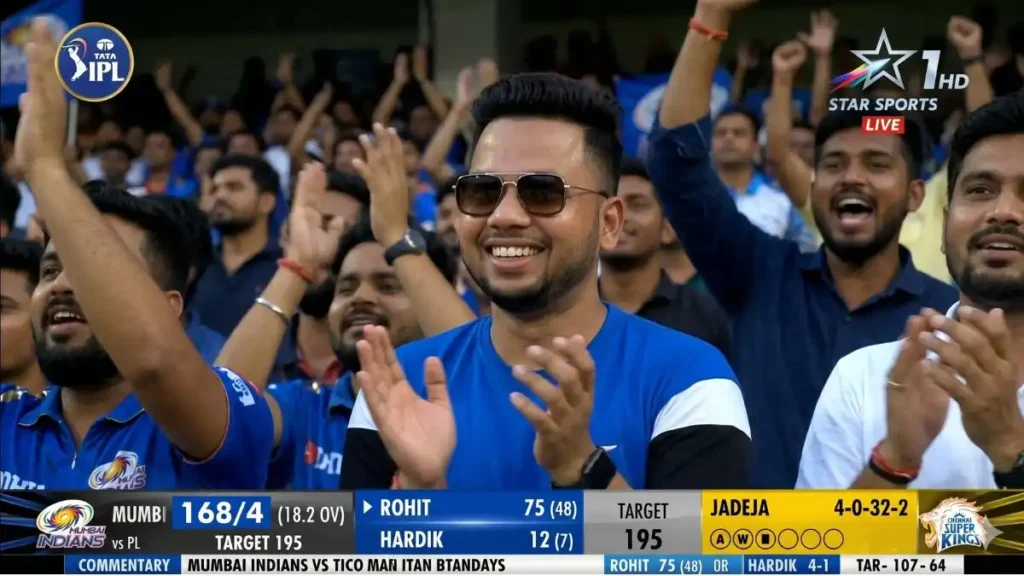
Image Prompt (16:9 Stadium Screenshot)
Boys IPL Stadium Prompt
Couple IPL Stadium Prompt
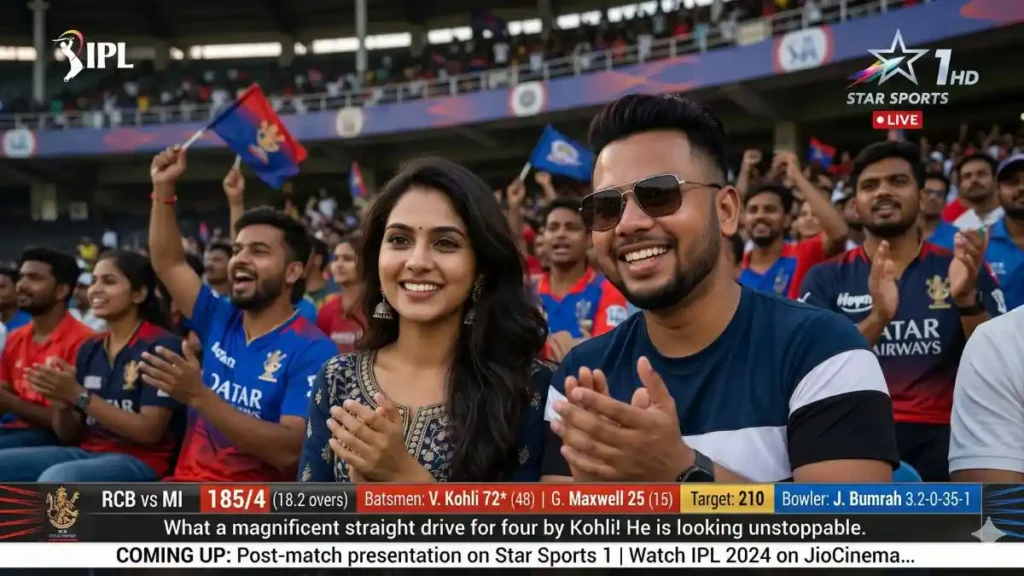
इससे क्या मिलेगा
- TV screenshot जैसा frame
- live score overlay
- crowd reaction shot
- face same रहेगा
- video बनाने के लिए perfect base image
अच्छी image के लिए छोटी लेकिन जरूरी बातें (Importent Tips )
कई लोग prompt सही डालते हैं लेकिन photo गलत चुनते हैं। फिर output खराब आता है।
ध्यान रखें:
- selfie बहुत close न हो
- front face साफ हो
- glasses हों तो वही रखें
- blur फोटो upload न करें
- face पर shadow कम हो
इन छोटी चीज़ों से final IPL trending AI video का look बहुत बदलता है।
Step 2: image को video में बदलने के दो तरीके
जब image तैयार हो जाए, तब उसे motion देना होता है। यही हिस्सा असली AI IPL video editing prompt पर depend करता है।
यहाँ मैंने जो test किया:
Paid tools
इनसे viral IPL AI video ज्यादा realistic बनी क्योंकि camera movement live telecast जैसा आया।
Free tools
अगर शुरुआत करनी है, free tools भी ठीक हैं। लेकिन कुछ बार rerun करना पड़ता है।
नीचे आपको free/paid दोनों तरीके से viral IPL AI video बनाने का स्टेप ब्य स्टेप तरीका मिलेगा जिससे आप समझ कर आसानी से विडिओ बना पाओगे।
Viral IPL AI Video बनाने का Paid तरीका: जब Viral IPL AI Video ज्यादा real चाहिए
अगर आप ऐसी viral IPL AI video बनाना चाहते हैं जो सच में live stadium broadcast जैसी लगे, तो paid tools बेहतर रहते हैं। खासकर जब आपका मकसद high-quality reels या professional content बनाना हो।
Step 1: अपनी best image तैयार करें
सबसे पहले अपनी वो image ready रखें जो आपने Google Gemini या ChatGPT से बनाई है। यहाँ quality सबसे important है क्योंकि उसी पर पूरी AI IPL video editing prompt depend करती है।
ध्यान रखें:
- face clear हो
- 16:9 ratio हो
- stadium crowd visible हो
- scoreboard overlay हो
Step 2: Higgsfield AI खोलें
Higgsfield AI वेबसाइट पर जाएं और login करें। Dashboard में “Image to Video” option चुनें। या menu में video विकल्प पर क्लिक करके seedance 2.0 विकल्प चुनें।
Step 3: Image upload करें
अपनी prepared stadium image upload करें। Preview में check करें कि face और background properly load हुआ है।
Step 4: Prompt paste करें
अब नीचे दिया गया IPL AI reel video prompt को View करके copy करें और tool में paste करें:
AI IPL video editing prompt
यह AI IPL video editing prompt ज्यादा अच्छा काम करता है, क्योंकि इसमें सिर्फ scene नहीं, पूरा motion behavior भी बताया गया है:
Step 5: Generate करें
Generate पर क्लिक करें और कुछ ही मिनट में आपकी viral IPL AI video तैयार हो जाएगी। Higgsfield में output ज्यादा smooth और broadcast-style आता है, इसलिए result अक्सर free tools से बेहतर होता है।
मैंने कई बार IPL trending AI video test की, और देखा कि Higgsfield AI crowd movement और camera feel काफी natural देता है। सही AI IPL video editing prompt के साथ इसका output ज्यादा authentic लगता है।
अगर आपका focus ज्यादा real IPL AI reel video prompt वाला result है, तो paid tools से बनी IPL trending AI video आमतौर पर ज्यादा natural लगती है।
Free में Viral IPL AI Video बनाने का तरीका: beginners के लिए आसान शुरुआत
अगर आप पहली बार IPL trending AI video बना रहे हैं और बिना पैसे खर्च किए ही चाहते हैं, तो free tools से भी अच्छी शुरुआत हो सकती है। सही image और सही viral IPL AI reel prompt हों, तो free version में भी काफी अच्छे results मिल जाते हैं।
Step 1: सबसे पहले अपनी AI से बनी IPL Statdium image तैयार रखें
वो image ready रखें जो आपने Google Gemini या ChatGPT से बनाई है।
ध्यान रहे:
- image 16:9 ratio में हो
- face साफ दिखे
- stadium crowd background हो
- score overlay visible हो
Strong image होने पर IPL trending AI video ज्यादा real बनती है।
Step 2: Qwen AI Studio खोलें
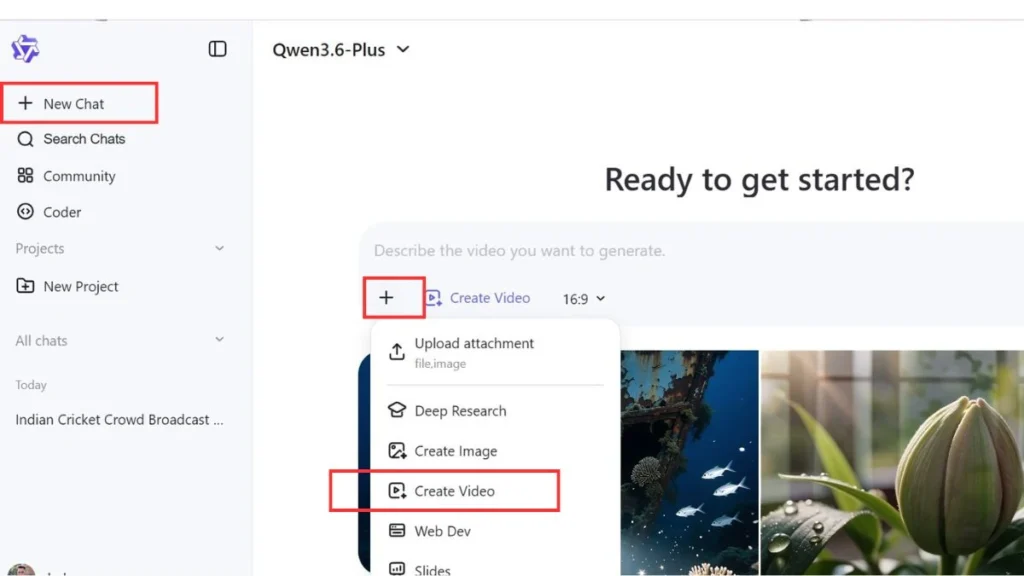
ब्राउज़र में Qwen AI Studio खोलें और login करें। होम स्क्रीन पर New Chat विकल्प चुने।
Step 3: Image to Video option चुनें
फिर आपको Plus + का निशान दिखेगा। उस पर क्लिक करके Create Video विकल्प चुनें।
Step 4: image upload करें
अपनी तैयार stadium photo upload करें जो आपने AI से बनाई थी। upload के बाद preview देखकर check करें कि image clear है।
Step 5: prompt paste करें
अब नीचे दिया गया IPL AI reel video prompt को View करके copy करें और tool में paste करें:
Free tools से Image to video बनाने के लिए Prompt
Step 6: generate पर क्लिक करें
Generate दबाएं। कुछ मिनट में पहली viral IPL AI video तैयार हो जाएगी। अगर पहली बार सही न बने, ये normal है। free tools में ऐसा होता है। फिर:
- prompt same रखें
- image same रखें
- बस rerun करें
2–3 बार में अच्छी IPL trending AI video मिल जाती है।
मैंने test में पाया कि Qwen AI Studio पर simple crowd shots ठीक आते हैं, खासकर जब image पहले से strong हो। इसके अलावा ये कुछ और free tools भी काम आते हैं:
इनसे शुरुआती viral IPL AI video बनाना आसान रहता है, खासकर practice के लिए।
ध्यान रखें
Free tools में कभी-कभी छोटी दिक्कतें आती हैं:
- face थोड़ा बदल सकता है
- scoreboard हट सकता है
- hands या body motion odd लग सकता है
इसलिए अगर पहली IPL AI video prompt पर perfect result न आए, तो 2–3 बार rerun करें। ज्यादातर creators free tools में यही करते हैं और फिर अच्छी IPL trending AI video मिल जाती है।
कौन सा tool बेहतर है?
मेरे हिसाब से:
| जरूरत | बेहतर tool |
|---|---|
| सबसे real output | Higgsfield AI |
| simple free use | Qwen AI Studio |
| fast testing | Flow AI |
| advanced experiments | OpenAI Sora |
नोट: इस लेख में बताए गए सभी tools और platforms केवल जानकारी और सीखने के उद्देश्य से साझा किए गए हैं। इनमें से किसी भी tool का paid promotion या sponsorship नहीं किया गया है। कौन सा tool आपके लिए सही रहेगा, यह आपकी जरूरत, बजट और इस्तेमाल के तरीके पर निर्भर करता है — इसलिए किसी भी सेवा का उपयोग करने से पहले खुद एक बार जांच लेना बेहतर रहता है।
कौन सा prompt सबसे अच्छा काम करता है?
अक्सर लोग short prompt डाल देते हैं, और यही गलती है। एक अच्छा viral IPL AI reel prompt सिर्फ scene नहीं बताता, बल्कि movement भी बताता है।
Prompt में ये चीज़ें रखें:
- crowd cheering
- slight camera shake
- stadium lights
- reaction after the boundary
- telephoto zoom
- live broadcast style
- score overlay
इनसे IPL trending AI video ज्यादा authentic लगती है।
जो गलती ज्यादातर लोग करते हैं
ये चीज़ avoid करें:
- सीधे normal photo से video
- portrait ratio use करना
- face crop करके upload
- prompt छोटा रखना
- cinematic words डालना
- no score overlay
अगर ऐसा करेंगे, वीडियो वायरल कम और fake ज्यादा लगेगा।
मेरी testing में सबसे अच्छा result कहाँ आया
मैंने एक same image को तीन tools पर चलाया।
Result:
- free tool → चेहरा थोड़ा बदला, लेकिन प्रॉम्प्ट सही ओर अच्छा इस्तेमाल किया जाए तो चेहरा रियल जैसा हि बनता हैं
- दूसरा free run → ठीक
- paid tool → almost असली telecast जैसा
यानी अगर आप serious content बना रहे हैं, paid tool बेहतर है। लेकिन सीखने के लिए या सोशल मीडिया पर normal पोस्ट के लिए free tools से भी अच्छी viral IPL AI video बन सकती है।
अच्छे result के लिए 5 practical tips
ये छोटी बातें बहुत फर्क डालती हैं:
- prompt में “real broadcast” जरूर लिखें
- “cinematic” avoid करें
- 16:9 ratio रखें
- face lock mention करें
- 10–15 sec ही रखें
इनसे आपकी IPL AI reel video prompt का output बेहतर आता है।
FAQs
क्या mobile से IPL trending AI video बन सकती है?
हाँ, पूरी IPL trending AI video मोबाइल से बन सकती है।
क्या free में viral IPL AI video बनेगी?
हाँ, free tools से भी viral IPL AI video बन सकती है।
कौन सा AI IPL video editing prompt सही है?
जिसमें crowd movement और live telecast feel हो।
क्या face same रहेगा?
अगर image clear है, काफी हद तक same रहता है।
निष्कर्ष
अगर सही image और सही IPL AI video prompt इस्तेमाल किए जाएं, तो अपनी फोटो से भी ऐसी viral IPL AI video बनाई जा सकती है जो बिल्कुल live match clip जैसी लगे। अभी IPL trending AI video तेजी से grow कर रही है, इसलिए सही समय पर सही content बनाने से reach जल्दी मिल सकती है।
शुरुआत के लिए free tools use करें। एक अच्छी stadium image बनाएं, फिर सही viral IPL AI reel prompt के साथ video generate करें। एक बार तरीका समझ आ गया, उसके बाद हर match trend पर नई IPL trending AI video बनाना आसान हो जाता है।